How to download Instagram photos and videos on PC with GetMeInsta.com
Instagram does not let you save media to your computer - GetMeInsta.com does, in three steps and without installing anything.
Why you need a downloader on PC
The Instagram website does not let you save photos or videos to your computer - the context menu only offers the image preview, not the original file. A third-party downloader is the only way to keep a copy.
GetMeInsta.com runs entirely in your browser: paste the post link, press Download and the original file is saved. It handles photos, videos, Reels, stories and profile pictures from public accounts in the quality Instagram serves - HD, 1080p, 2K or 4K.
No installer, no extension, no account - which also means it works on a locked-down work laptop.
Step 1: copy the Instagram link
Open the post with the photo or video you want, click the three-dot icon (●●●) and choose Copy link.
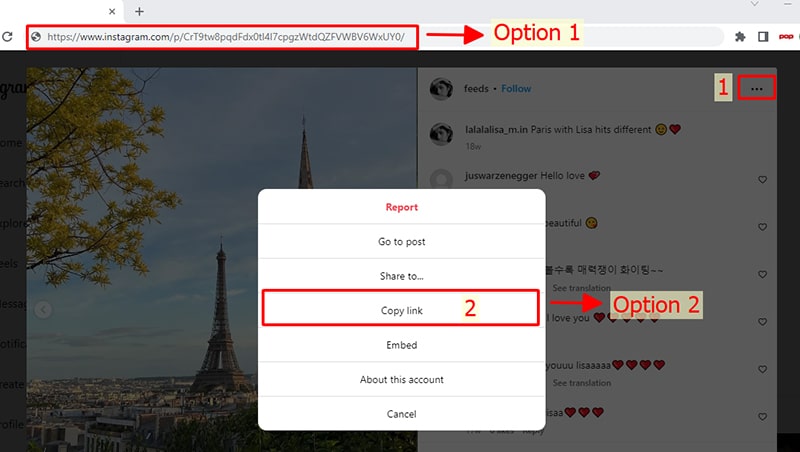
Step 2: paste the link into the input box
Open GetMeInsta.com in any browser on your computer, paste the copied link into the box at the top of the page and press Download.
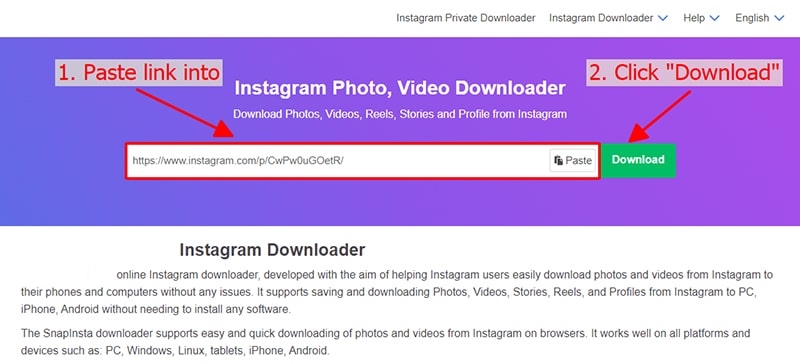
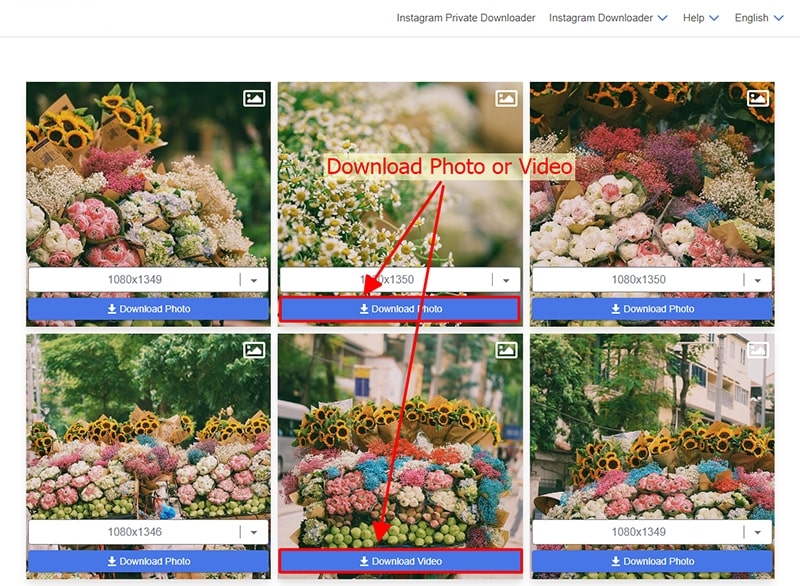
Step 3: save the photo or video to your device
The photo or video appears as a card - click Download and the browser saves the file straight away.
Open Downloads from the browser menu (Ctrl + J on Windows and Linux, Cmd + Shift + L on macOS) or your system Downloads folder - everything you saved is listed there.
Where the files are saved
| System | Default folder | Shortcut |
|---|---|---|
| Windows | C:\Users\ | Ctrl + J |
| macOS | ~/Downloads | Cmd + Shift + L |
| Linux | ~/Downloads | Ctrl + J |
Notes and troubleshooting
- Only public accounts can be resolved - private posts are never bypassed
- A link expires after a few hours: copy a fresh one and resolve again
- Chrome shows Failed - Blocked? Open the Downloads list and click Keep
- Video plays inline instead of saving: right-click the button and choose Save link as
- Screenshots above are placeholders until you add your own captures
Still stuck? Write to support [at] getmeinsta [dot] com or use the contact page.